
PC gaming is having a moment. More people are playing, hardware keeps getting more powerful, and big releases pull in millions of players at once.
But that power usually sits in one place. A serious gaming rig lives on a desk at home, plugged into the wall and tied to one room.
So what happens when you are on the couch, at the office, or away for the weekend? More players are turning to a simple fix.
The answer is not a new console or a second PC. It is a way to reach the machine you already own from wherever you happen to be.
This guide explains, in plain terms, how remote desktop tools let PC players reach their home rig from almost anywhere, and why the idea is catching on.
PC Gaming Is Bigger Than Ever
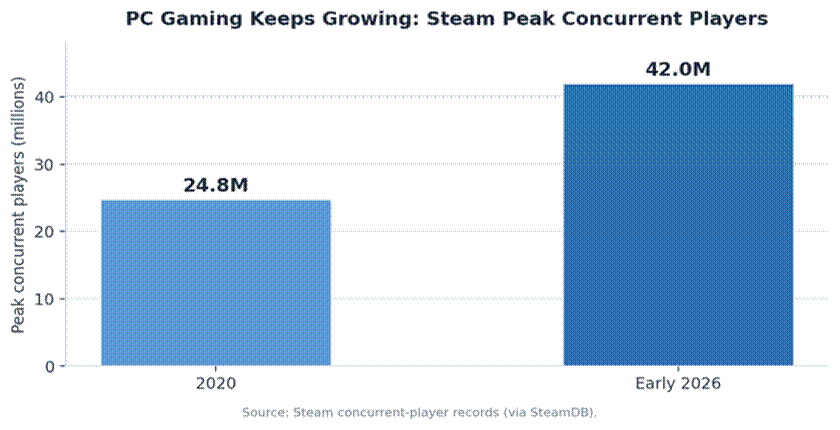
The scale of PC gaming today is hard to overstate. In early 2026, Steam set an all-time record of around 42 million players online at the same moment.
That is up from roughly 25 million at the start of the decade, a sign of just how fast the audience has grown.
With so many players investing in capable machines, getting more value out of that hardware has become a real priority. A growing community, including fans of the best Linux distros for gamers, wants to play on their own terms, on their own devices.
Remote desktop fits neatly into that wish. It stretches one powerful PC across every screen a player owns.
So, What Is Remote Desktop for Gaming?
It helps to begin with the basics of what is remote desktop for gaming, since that technology is what makes remote play possible in the first place.
In short, it is software that lets one device see and control another over the internet. Your gaming PC does the actual work, while a laptop, tablet, or phone shows the screen and sends your inputs.
This is different from cloud gaming. With cloud gaming, you rent time on a distant server you do not own. With a remote desktop, you connect to your own rig, with your own games, mods, and saves.
It is part of the same broad move toward cloud-based computing, where the device in your hand matters less than the system you can reach.
Why More PC Players Are Using It
The appeal comes down to freedom. The table below shows the most common reasons players reach for remote desktop.
|
Use case |
What it lets you do |
|
Play from any device |
Reach your home rig from a laptop, tablet, or phone |
|
Game away from home |
Log in from a dorm, office, or another city |
|
Use a thin or old device |
Let the powerful PC do the work, not the screen |
|
Cross-platform play |
Reach Windows-only games from a Mac or Linux laptop |
|
Manage your library |
Start downloads and updates before you get home |
|
Share one strong PC |
A household runs several devices off one machine |
Playing from any device is the headline. The expensive rig stays home and cool, while a light laptop becomes the window into it.
Flexibility matters too. A quick session during a lunch break or a trip no longer means hauling a heavy machine or leaving your library behind.
For players on Mac or Linux, it opens doors. A Windows-only title on the home PC becomes reachable from whatever laptop is on hand.
Who Gets the Most Out of It
Almost any PC player can benefit, but a few groups feel the difference right away.
Travelers and commuters gain the most obvious win. Their full library and settings follow them, with no need to pack a bulky machine.
Households with one strong PC also win big. Different family members can use lighter devices around the home without fighting over the desk.
Mac and Linux users get a neat workaround for Windows-only games, reaching them through their home rig instead of dual-booting or buying a second PC.
Students in dorms round out the list, since a powerful machine can stay safely at home while a laptop handles the day-to-day.
The Tech Behind It
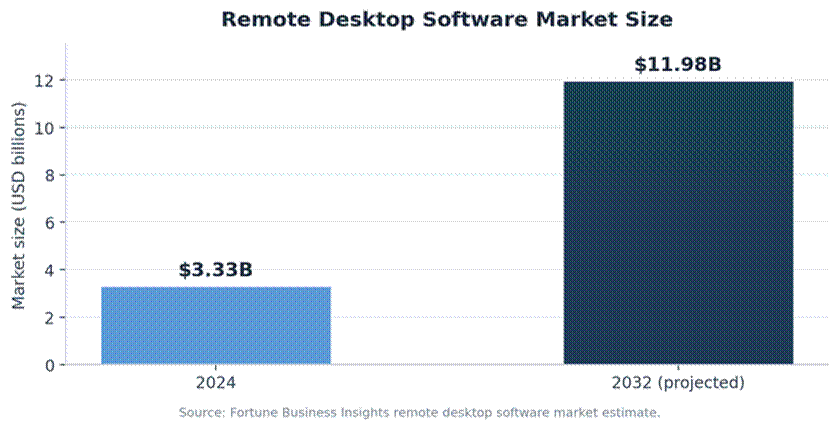
Demand for tools like this is climbing. One industry estimate puts the remote desktop software market at 3.33 billion dollars in 2024, rising to nearly 12 billion by 2032.
The setup itself is straightforward. You install a host program on the gaming PC and a client app on the device you want to play from, then connect the two over your network.
Once paired, the two devices talk directly, so your games launch from the home rig while your laptop simply mirrors the action.
The same idea powers everyday tech support. The way these tools handle remote support across different operating systems is exactly what lets a Linux laptop drive a Windows gaming PC.
Latency: The Honest Part
Remote play is not magic. Because your inputs travel to the PC and the video travels back, there is always some delay.
For many games, that delay is barely noticeable. Strategy titles, role-playing games, turn-based games, and most single-player adventures feel fine.
Fast, competitive shooters are the tough case. At a high level, even small lag can matter, so the home setup will always have an edge for those.
That same distance-equals-delay principle applies on the other side of PC gaming too — if you host a multiplayer world for friends rather than streaming your own rig, low-latency game server hosting by PingPlayers puts the server itself close to your group instead of close to just you, which matters just as much for a shared world as network distance does for a remote desktop session.
Keeping Your Setup Secure
A gaming PC holds more than games. It often stores payment details, accounts, and personal files, which makes security worth a few minutes of setup.
The basics go a long way. Use a strong, unique password on the host PC, turn on multi-factor authentication, and pick a tool that encrypts the connection.
Open networks deserve extra care. When you connect from a cafe or hotel, secure your connection on public networks so no one can snoop on the link.
Finally, keep both devices updated. Patches close the gaps that attackers rely on, and they take only minutes to apply.
How to Get Started
Setting this up is easier than most people expect. A careful first run beats a rushed one.
A few steps will get most players up and running.
• Install a host app on your gaming PC and a client app on your other device.
• Set a strong password and turn on multi-factor authentication.
• Connect on your home network first to test pictures and controls.
• Use a wired link or 5 GHz Wi-Fi for the smoothest experience.
• Adjust the resolution and frame rate to match your connection.
Once it feels good at home, try it from another network. Start with slower-paced games, then judge for yourself which titles travel well.
Frequently Asked Questions
Is a remote desktop the same as cloud gaming?
No. Cloud gaming rents a distant server, while remote desktop connects you to your own PC, with your own installed games and saves.
Can I play fast shooters this way?
You can, but expect some input lag. Competitive shooters feel best on the home PC, while slower games travel very well.
Do I need a powerful laptop to play?
No. The home PC does the heavy lifting, so even a modest laptop, tablet, or phone can act as the screen and controller.
Will it work over Wi-Fi?
Yes, though a wired connection is steadier. A strong 5 GHz Wi-Fi signal is usually fine for most games.
Is it safe to use?
It is, with a sensible setup. Strong passwords, multi-factor authentication, encryption, and care on public networks cover the main risks.
What internet speed do I need?
A stable connection matters more than a fast one. Many tools adjust quality on the fly, so a steady mid-range connection handles most games well.
The Bottom Line
Remote desktop turns a single gaming PC into something you can reach from nearly any screen you own. That is a powerful upgrade for how and where you play.
It will not replace a wired setup for top-level competition, but for everything else it adds real freedom without new hardware.
As PC gaming keeps growing, expect more players to treat remote access as a normal part of the kit, not a niche trick.
The hardware you already own can simply do more. For most players, that is the whole appeal in a single sentence.
