
Remote support often looks simple until the devices stop behaving like the same kind of device.
A support technician can connect to a Windows laptop, restart a service, update a driver, and move on. Then the next request comes from a Mac user who needs to approve screen recording permissions before the technician can see anything. After that, a Linux workstation in a lab is online, but it is running Wayland, and the usual remote-control assumptions no longer apply. Somewhere else, a shared machine needs maintenance after hours, but there is no user sitting in front of it to approve the session.
That is where remote support becomes less about “remote desktop software” and more about operations. Mixed operating system environments introduce different permission rules, session behaviors, packaging formats, login states, and user expectations. A remote support solution for mixed OS environments has to account for those differences instead of pretending every device behaves like a standard office PC.
Mixed OS Support Is Not Just “More Devices”
Supporting Windows, macOS, and Linux together is not only a scale problem. It is a consistency problem.
Windows machines are often managed around familiar admin models, user accounts, services, RDP-related expectations, and endpoint management tools. macOS has its own security model, especially around screen recording, accessibility access, and user approval prompts. Linux adds another layer because the operating system is not a single desktop environment or vendor-controlled platform.
This affects everyday support work in practical ways. A technician may need to know whether a device can be reached before login, whether the current user must approve control, whether a reboot will break the connection, and whether a support session can continue after switching users. These are not small details during urgent troubleshooting.
Mixed OS environments also create different update habits. Windows devices may follow centralized update policies. Macs may depend on user-driven OS updates or MDM configuration. Linux systems may be updated through distribution-specific package managers, custom scripts, or not updated at all if they are tied to internal tools.
The result is that IT support for mixed operating systems becomes a workflow issue. Teams need tools and procedures that reflect how each operating system actually works.
Why Linux Adds a Different Layer of Complexity
Linux changes the rules because Linux is not one fixed environment.
A company might have Ubuntu workstations for developers, Fedora laptops for technical users, CentOS-based machines supporting internal infrastructure, and lightweight Linux systems running kiosks or lab equipment. Some machines use GNOME, others use KDE, and some may have minimal desktop setups. Even when the user-facing task is simple, the remote support path can differ.
Packaging is one example. A tool that supports Ubuntu through DEB packages may not automatically fit RPM-based distributions such as Fedora or CentOS. For a small team, that can mean maintaining different installation steps depending on the machine.
Desktop session behavior is another major factor. Linux systems may run X11 or Wayland. This matters because remote desktop support for Linux depends heavily on how the display server handles screen access, input control, permissions, and login states.
X11 has historically allowed deeper remote-control behavior, including access around the login screen in many configurations. Wayland is more restrictive by design. That is not a flaw in Linux; it is part of a broader security model. Wayland limits what applications can see and control, which helps prevent unauthorized screen capture and input injection. The tradeoff is that support tools may need extra permission prompts or may not be able to control the device before a user session starts.
This is why Linux can be both excellent and complicated as a support target. Its flexibility is exactly what makes it useful in developer environments, labs, servers, embedded systems, and technical workstations. The same flexibility also means support teams cannot assume one Linux workflow will cover every Linux machine.
Where Unattended Access Matters
On-demand support is useful when a user is present. The user clicks a link, approves a session, explains the issue, and the technician helps.
That model breaks down when the device needs attention and no one is there.
Unattended remote access matters in several common situations:
- Maintenance outside working hours
- Shared lab computers
- Kiosks and internal tools
- Developer workstations
- Remote Linux workstations
- Small business systems without a local administrator
- Devices used by geographically distributed teams
A lab machine may need updates before the next group uses it. A Linux workstation may require package cleanup, configuration changes, or service checks. A kiosk may need a restart or application fix. A remote employee’s machine may need support while they are away from the keyboard.
In these cases, asking for repeated user approval creates friction. It may also make support impossible. Unattended access allows a machine to be configured once and reconnected to later when it is online. For routine support, that difference is significant.
The key is control. Teams need to decide which machines require persistent access and which should remain on-demand only. Not every device needs unattended access. But when it is needed, the tool must handle the operating system’s actual permission model.
What a Practical Mixed OS Remote Support Tool Should Provide
A practical cross-platform remote support setup should start with the real device estate, not with a feature checklist.
At a minimum, teams should look for support across Windows, macOS, and Linux. That sounds obvious, but Linux support is often partial, limited, or handled differently from Windows and macOS. Some tools support Linux only as a client. Others allow viewing but not full unattended workflows.
A useful tool should provide both on-demand and unattended access options. On-demand access works well for one-time troubleshooting. Unattended access is better for known machines that require ongoing administration.
The setup process also matters. If the host installation is too unclear, support teams will spend more time explaining the tool than fixing the problem. This is especially important for less technical users and shared machines where the person at the keyboard may not be the device owner.
For Linux specifically, teams should check distribution support, package formats, desktop environment behavior, and X11 versus Wayland limitations. A tool does not need to remove every OS-level limitation, because some restrictions are there for security reasons. But it should make those limitations clear.
A practical mixed OS remote support tool should also reconnect reliably when the device is online, handle permissions in a way that matches the operating system, and support workflows where the technician is not always dealing with a single personal laptop.
Where HelpWire Fits
Mixed OS support becomes harder when Linux support is incomplete or when unattended access works well only on Windows and macOS. That is the gap many teams run into when their environment grows beyond standard office laptops.
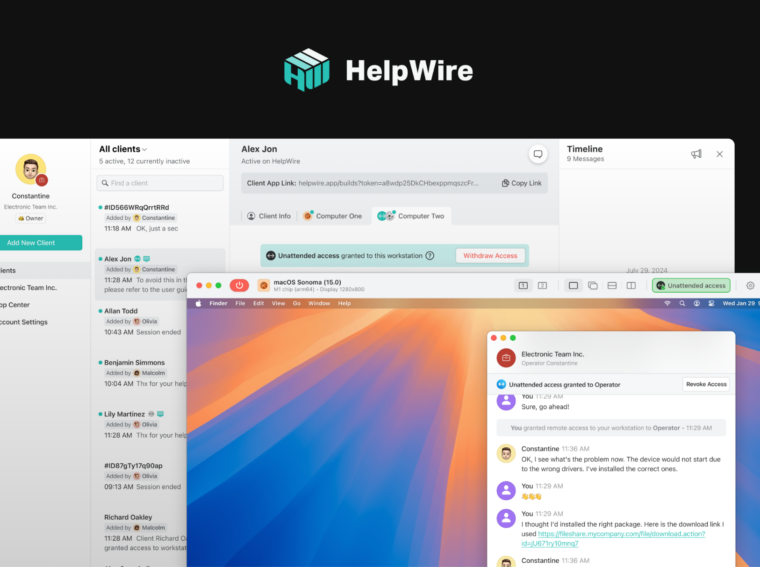
HelpWire is one relevant example of a remote support tool designed for cross-platform remote support across Windows, macOS, and Linux. Its recent Linux unattended access support is especially relevant for teams that need persistent access to Linux machines rather than one-time sessions only.
With HelpWire, a Linux machine can be configured for unattended access and reconnected to later when the device is online, without repeated approval from the end user. That makes it more practical for maintenance, shared systems, labs, kiosks, internal tools, and remote Linux workstations.
Current Linux support includes Ubuntu 18.04–24.04 through DEB packages. RPM support covers CentOS 8/9 and Fedora 41. That does not cover every possible Linux distribution, but it addresses several common workstation and server-adjacent environments.
The X11 and Wayland distinction remains important. On X11, HelpWire supports full unattended access, including login screen access. On Wayland, login screen access is not available because of OS-level limitations. Wayland may also require additional permission prompts during setup.
That is a useful example of how remote support for Windows macOS Linux environments should be discussed: not as a promise that every platform behaves the same, but as a clear explanation of what works, where it works, and where the operating system imposes boundaries.
Practical Takeaways for IT Teams
Before choosing or standardizing a remote support workflow, teams should map the environment they actually have.
Start by listing the operating systems in use. Then go deeper. For Linux, document the distributions, versions, desktop environments, and whether systems use X11 or Wayland. For macOS, check what permissions users need to approve. For Windows, clarify whether machines are personal laptops, shared devices, domain-managed systems, or remote workstations.
Next, separate on-demand support from unattended access. A user’s personal laptop may only need on-demand support. A lab machine, kiosk, or remote workstation may need unattended remote access because no one is consistently available to approve a session.
Teams should also document permission and approval steps for each OS. This avoids confusion during urgent support cases. A technician should not be discovering Wayland limitations or macOS screen recording permissions for the first time during an outage.
Testing matters as well. Remote access workflows should be tested before they become critical. That includes reboot behavior, login screen behavior, reconnect reliability, user switching, and permission prompts.
Mixed OS support is manageable, but it requires a process. The software is only one part of that process.
Conclusion
Remote support across Windows, macOS, and Linux is more complex than supporting a uniform fleet of laptops. The differences show up in permissions, packaging, session behavior, desktop environments, and unattended access requirements.
Linux adds extra complexity because it is flexible and varied by design. That flexibility is useful, but it requires support teams to pay attention to distribution support, X11 versus Wayland behavior, and login-state limitations.
A good remote support solution for mixed OS environments should match the real environment rather than assume every system works the same way. Tools such as HelpWire are relevant here because they address cross-platform access and now include Linux unattended access for common DEB and RPM-based setups.
The broader lesson is simple: treat mixed OS support as an operational discipline. Know the machines, document the constraints, test the workflows, and choose tools that fit the systems your team actually supports.
